Younify Connect — connect your app to streaming user data
The Younify Connect SDK handles the complexity of streaming account authentication for your app. The Younify Connect API delivers user watch history, cross-service watchlists, and ratings data so your app can start personalizing instantly.
Netflix · Hulu · Prime Video · Disney+ · HBO Max · Paramount+ · Peacock · Apple TV · Discovery+ · Tubi · Pluto TV · Roku Channel · YouTube · Fandango
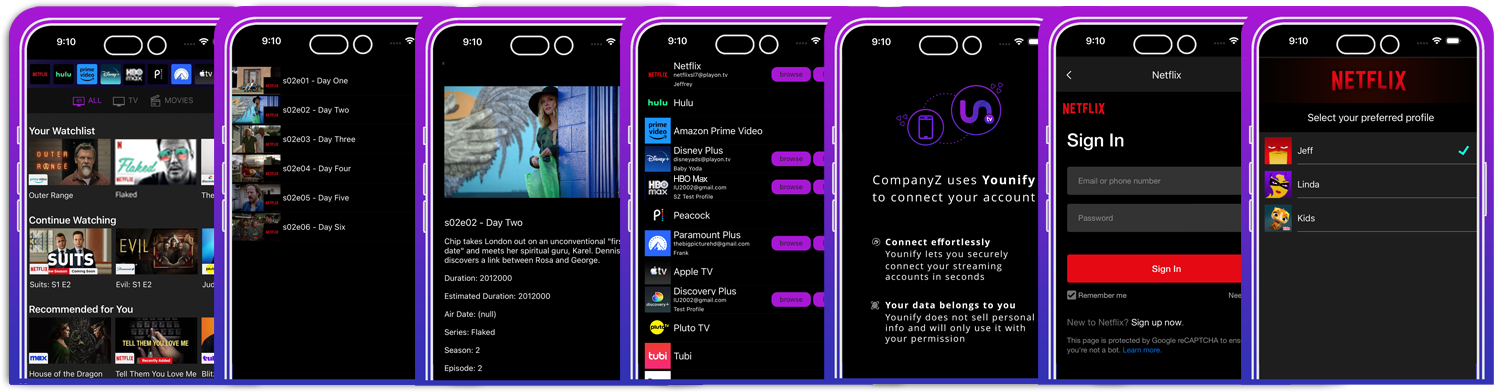
younify-connect-sdk · sample screens
The use of third-party trademarks on this site is intended to imply neither any endorsement by nor any affiliation with the respective trademark owners.
Partner Resources
Your developer toolkit
Already a partner? Here is everything you need to manage your SDK integration, API access, projects, and support workflows.
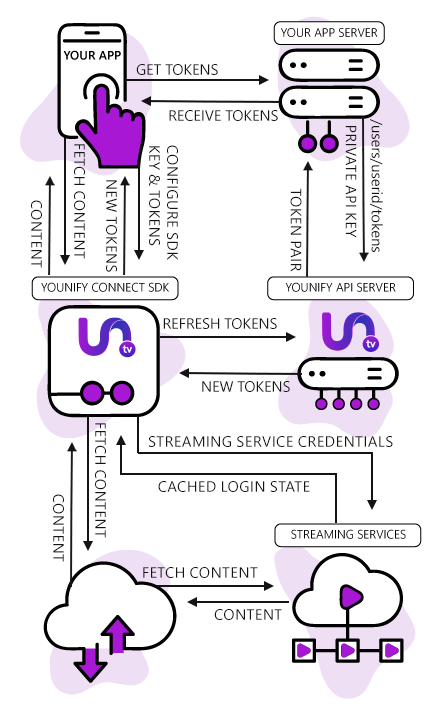
Younify Connect handles the streaming authentication flow end to end — from MFA and CAPTCHA to session renewal — so your backend never has to process or store a user’s streaming credentials.
1
Request API Tokens
Get token pair through backend app server using API Key
POST /v1/auth/token
2
Initialize SDK
Initialize Younify Connect SDK using the SDK key and the acquired token pair
YCS.initialize(sdkKey, tokens)
3
Token Renewal
Handle access token renewal when expired and needs renewing via the backend
onTokenExpired(handler:)
4
User Links Streaming Service
Enable end user to login to streaming services through the SDK UI
YCS.connect(service: .netflix)
5
Fetch Streaming Data
Fetch personalized content categories for all logged-in streaming services for the end user
GET /v1/user/watchlist
// YOUNIFY CONNECT SDK ARCHITECTURE OVERVIEW
API Data Objects
Watch history, watchlists, and ratings API
Every response is normalized to a consistent schema, regardless of which streaming service the data came from. One integration covers all 14+ services — giving you the watch history and watchlist data you need to solve the cold start problem from a user's very first session.
Watch History
Viewing Timeline
Full chronological history of every title a user has watched, including partial views, completion percentage, and timestamps.
Watchlist
Saved & Queued Titles
Cross-service saved titles, continue watching queues, and bookmarked content — merged and deduplicated across all connected services.
Ratings
User Ratings
Star ratings and thumbs up/down signals consolidated across all connected services.
Recommendations
Provider Recommendations Feed
Curated recommendations from each streaming service — personalized for the user by the provider's own algorithm, delivered to your app.
Access begins with a one-time implementation fee. The SDK requires an API Key and SDK Key issued through the partner portal. Contact us to get started — once you have access, you can create and manage keys directly in the partner portal.
No. Credential handling, MFA, CAPTCHA solving, and session management are all handled inside the YCS SDK layer. Your app only receives normalized data objects — never raw credentials or tokens from the streaming services.
Your backend server handles access token renewal by calling the Management API. The SDK fires an onTokenExpired delegate callback when a token needs refreshing, giving your backend the signal to request a new pair and re-initialize the SDK.
Currently: Netflix, Hulu, Prime Video, Disney+, HBO Max, Paramount+, Peacock, Apple TV, Discovery+, Tubi, Pluto TV, Fandango, YouTube, and Roku Channel — 14 services in total. New services are added regularly. These services are available in any country in which they operate — if a supported provider serves your region, the API works there. We do not currently support region-specific services, though roadmap priorities respond to partner demand.
The cold start problem happens when new users have no viewing history in your app, so your recommendation engine has nothing to work with. By connecting their existing streaming accounts through the Younify Connect SDK, you get immediate access to years of real watch history, watchlists, and ratings — before the user has watched a single thing in your app. History extends back to the user's first recorded activity on the service — it is not a rolling window.
Most partners have the SDK initialized and returning real data within a few hours of receiving their keys. Full production integration — including UI polish and backend token management — typically takes 1–3 days depending on your app's architecture.
Users accept VPPA consent along with Younify's Terms of Use and Privacy Policy — two checkboxes on a single screen, shown on the consent screen. All data collected through the Content Services API is owned by Younify; partners receive a limited, non-exclusive, revocable license to use it within their application. Each party is an independent controller of the personal data it processes and obtains the consents allocated to it. If a user disconnects a streaming account, normalized records already held in your product may remain if the user chooses to keep them.
Platform and Compatibility
+
Yes. A web app is available — documentation is at my.younify.tv/services/partner-integration.html. Native SDKs remain available for iOS, Android, React Native and .NET MAUI. However, account linking is not supported in mobile web apps.
No. Account linking requires a desktop browser — Chrome or Edge — with the Younify extension installed. It cannot be completed from a mobile web app. Everything other than account linking works on virtually any platform, so a mobile-first product can treat linking as a one-time desktop step.
There is no official Flutter wrapper, but the native iOS and Android SDKs are straightforward to wrap.
The SDK does not bundle its own copy of React Native — it compiles against the version your host application provides. Build the sample app on your React Native version to confirm compatibility.
Data and Synchronization
+
Daily, and on end-user request.
Webhooks. We send a POST when a data refresh completes — do not schedule the user-initiated refresh endpoint to run in the background. Subscriptions are configured in the partner portal. Available events are UserDataRefreshCompleted, UserFilePosted, InitialFilePosted and DeltaFilePosted. The receiving endpoint must be SSL. An optional signature secret key is passed as the Signature header so you can verify the request has not been tampered with.
To the user's first recorded activity on the service.
In roughly 95% of cases. The remaining 5% are older items for which the service no longer retains bookmark data.
Yes. Episode-level IDs are returned in approximately 95% of cases. Where a bookmark cannot be resolved — usually older activity, or content no longer carried by the service — the episode ID is omitted.
Each linked account selects one streaming profile to pull data from.
Watchlist functionality is currently read-only.
Yes. A Watch Now URL is included among the properties returned for a title, so you can send a user directly to the content on the provider's service. The full property list is in the SDK documentation.
We do not currently enforce strict rate limits, but we ask partners to use the API responsibly. In particular, do not trigger data collection outside the normal daily automatic cadence unless a user has explicitly pressed a refresh control in your application.
The linked account moves to a broken state and we notify you. You can surface that to your user however you prefer; they re-authenticate through the Younify login flow.
Commercial and Data Use
+
A one-time implementation fee, followed by a monthly fee per user-service linked account. A linked account is one user connected to one streaming service — user A to Netflix and user A to Hulu count as two user-linked accounts.
Yes. We have a start-up program, but there is no free or non-commercial tier.
There are no restrictions on caching Younify data within your application while you are an active partner under agreement.
Not yet a partner?
Get access to Younify Connect
Request access by filling out the partner inquiry form and we’ll get you set up with API access, SDK credentials, and a partner portal account so you can begin building with Younify Connect.